Support Contact: Anthony Klemm, NOAA Office of Coast Survey anthony.r.klemm@noaa.gov
Perform the following steps to process CSB data extracted from NCEI/DCDB to correct for tides and data-derived vessel transducer offset values: 1. You will need to download the **Pydro** software[ here.](https://svn.pydro.noaa.gov/Docs/html/Pydro/downloads.html) 2. Follow the [Data Extraction](https://cms-kb.marine.usf.edu/books/crowdsourced-bathymetry-manual-2026/page/nceidcdb-data-extraction "NCEI/DCDB data extraction") instructions to retrieve the data you want to process. 3. When you receive the email link from NCEI, download the data and save it in an appropriate location. 4. Open **Pydro**, navigate to the ‘**BETA/EXPERIMENTAL**’ section of the Applications pane, and select ‘**CSB Processing.’** **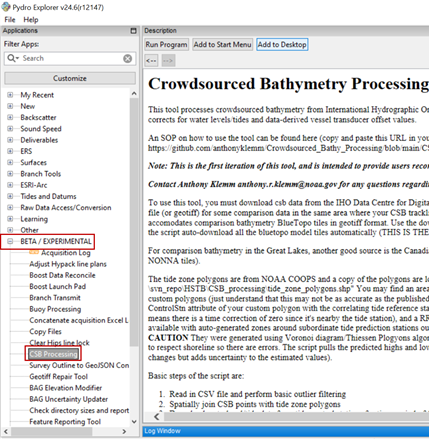** 5. Click '**Run Program**'. You’ll see a Windows terminal execute the python environment and a GUI should eventually pop up. 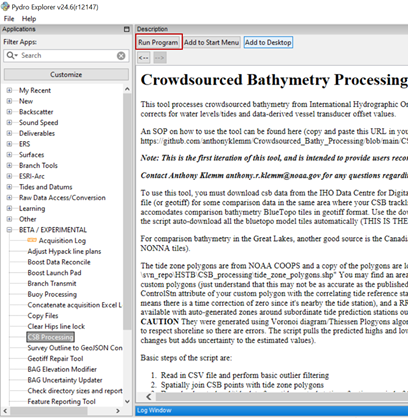If no GUI pops up, open the command line window to check if the following error was encountered: `ModuleNotFoundError: No module named 'pyfes' `
To resolve this error, enter the following line of code: `conda install -c conda-forge pyfes` Click **Run Program** again and the GUI should pop up. 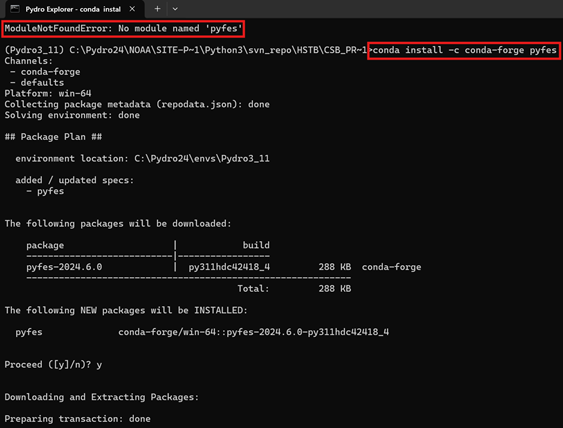 6. In the popup window: **(1)** locate and select the **Folder** containing the file you downloaded from NCEI; navigate to the Tide Zone Beta.shp file (see file path provided below); and specify an output folder. **(2)** make sure this is checked to use automated BlueTopo data, **(3)** the checked boxes in the image below are the suggested outputs and grid resolution **(5-10)** for the workflow. **Note:** to streamline data processing, set a designated folder where Pydro outputs .gpkg files, so a single folder connection can be added to your GIS project. For use outside the United States, the CSB Processing tool has an option to use a global tide model (AVISO+ FES2022b) to resolve/correct depths to approximate Lowest Astronomical Tide (approx LAT). Inside United States waters, it is recommended (but not required) to use the Discrete Tide Zoning model option instead.
**US Tide Zone .shp location:** C:\\Pydro24\\NOAA\\site-packages\\Python3\\svn\_repo\\HSTB\\CSB\_processing\\BETA\_subordinate\_tide\_zones\\tide\_zone\_polygons\_new\_WGS84\_merge.shp
7. Click '**Start** **Processing**' and allow it to run. You can watch processing progress in the command line window. The application window will close when processing is complete. 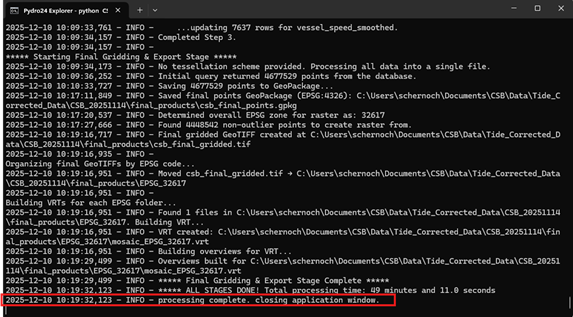Your CSB data are now tide corrected and have been output in a GeoPackage (.gpkg) that can be [visualized using GIS software](https://cms-kb.marine.usf.edu/books/crowdsourced-bathymetry-manual-2026/chapter/data-visualization "Data Visualization").