# ArcGIS: Editing tide-corrected CSB data

For Trusted Nodes that have access to ESRI software licenses, tide-corrected CSB data can be edited and visualized using ArcGIS Pro.

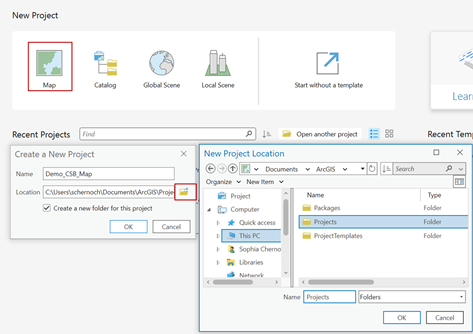
<span style="mso-bidi-font-family: Aptos; mso-bidi-theme-font: minor-latin;"><span style="mso-list: Ignore;">1.<span style="font: 7.0pt 'Times New Roman';"> </span></span></span>Launch **ArcGIS Pro** and select **'Map'** under **New Project**. Create a name and select a location to save your project.
<span style="font-family: 'Calibri',sans-serif; color: #444444; border: none windowtext 1.0pt; mso-border-alt: none windowtext 0in; padding: 0in; mso-no-proof: yes;">![](https://cms-kb.marine.usf.edu/uploads/images/gallery/2026-01/embedded-image-5owat1gs.png)</span>

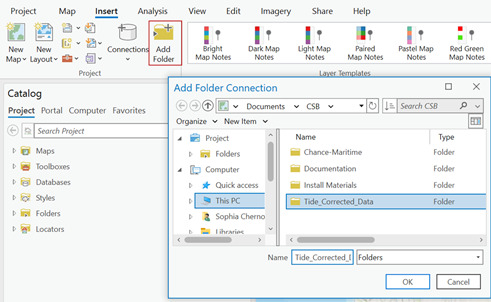
<span style="mso-bidi-font-family: Aptos; mso-bidi-theme-font: minor-latin;"><span style="mso-list: Ignore;">2.<span style="font: 7.0pt 'Times New Roman';"> </span></span></span>Under the **Insert** tab click '**Add Folder**' and select the folder where you set Pydro to output tide corrected data.
<span style="font-family: 'Calibri',sans-serif; color: #444444; border: none windowtext 1.0pt; mso-border-alt: none windowtext 0in; padding: 0in; mso-no-proof: yes;">![](https://cms-kb.marine.usf.edu/uploads/images/gallery/2026-01/embedded-image-sjthskmz.png)</span>

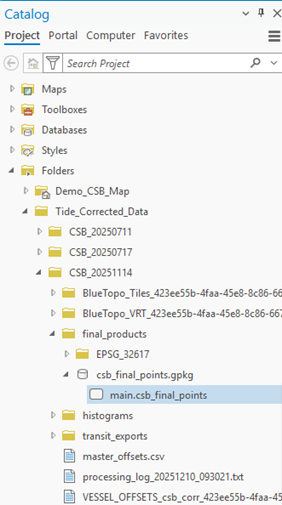
<span style="mso-bidi-font-family: Aptos; mso-bidi-theme-font: minor-latin;"><span style="mso-list: Ignore;">3.<span style="font: 7.0pt 'Times New Roman';"> </span></span></span>In the **Catalog** pane, click on the **Folders** dropdown, open the folder you just connected and locate the GeoPackage (**.gpkg**) that contains the tide corrected shapefile (**main.csb\_final\_points**). C*lick and drag* the **main.csb\_final\_points** file over the base map to add it as a map layer.
<span style="font-family: 'Calibri',sans-serif; color: #444444; border: none windowtext 1.0pt; mso-border-alt: none windowtext 0in; padding: 0in; mso-no-proof: yes;">![](https://cms-kb.marine.usf.edu/uploads/images/gallery/2026-01/embedded-image-gfdhtwzo.png)</span>

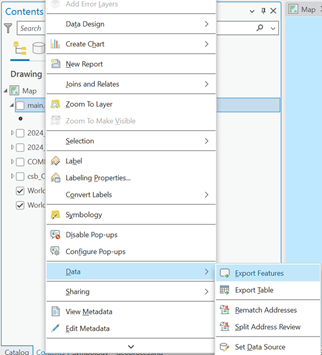
<span style="mso-bidi-font-family: Aptos; mso-bidi-theme-font: minor-latin;"><span style="mso-list: Ignore;">4.<span style="font: 7.0pt 'Times New Roman';"> </span></span></span>In the **Contents** pane, *right click* on the **main.csb\_final\_points** layer, click on the **Data** dropdown menu and select '**Export Features**.'
<span style="font-family: 'Calibri',sans-serif; color: #444444; border: none windowtext 1.0pt; mso-border-alt: none windowtext 0in; padding: 0in; mso-no-proof: yes;">![](https://cms-kb.marine.usf.edu/uploads/images/gallery/2026-01/embedded-image-0bthbraa.png)</span>

<span style="mso-bidi-font-family: Aptos; mso-bidi-theme-font: minor-latin;"><span style="mso-list: Ignore;">5.<span style="font: 7.0pt 'Times New Roman';"> </span></span></span>When the **Export Features** box appears, enter an appropriate name for the **Output Feature Class**, and click '**OK**'.
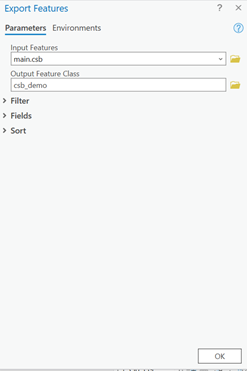
<span style="font-family: 'Calibri',sans-serif; color: #444444; border: none windowtext 1.0pt; mso-border-alt: none windowtext 0in; padding: 0in; mso-no-proof: yes;">![](https://cms-kb.marine.usf.edu/uploads/images/gallery/2026-01/embedded-image-phxk7foq.png)</span>

<span style="mso-bidi-font-family: Aptos; mso-bidi-theme-font: minor-latin;"><span style="mso-list: Ignore;">6.<span style="font: 7.0pt 'Times New Roman';"> </span></span></span>In the **Contents** pane, *right click* on the feature layer you just created and click on '**Attribute Table**.'
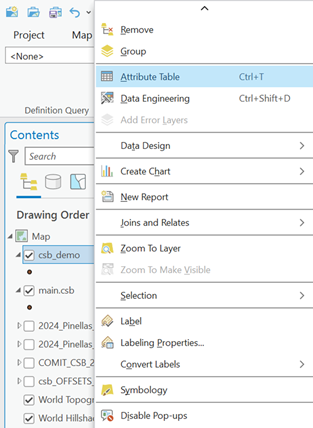
<span style="font-family: 'Calibri',sans-serif; color: #444444; border: none windowtext 1.0pt; mso-border-alt: none windowtext 0in; padding: 0in; mso-no-proof: yes;">![](https://cms-kb.marine.usf.edu/uploads/images/gallery/2026-01/embedded-image-lslxjqod.png)</span>

<span style="mso-bidi-font-family: Aptos; mso-bidi-theme-font: minor-latin;"><span style="mso-list: Ignore;">7.<span style="font: 7.0pt 'Times New Roman';"> </span></span></span>The attribute table should contain the following columns: **lat, lon, depth, time,** and **platform\_name**.
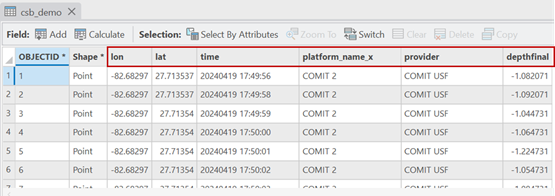
<span style="font-family: 'Calibri',sans-serif; color: #444444; border: none windowtext 1.0pt; mso-border-alt: none windowtext 0in; padding: 0in; mso-no-proof: yes;">![](https://cms-kb.marine.usf.edu/uploads/images/gallery/2026-01/embedded-image-cdgm2fa7.png)</span>

<p class="callout success"><span style="font-family: 'Calibri',sans-serif; color: #444444; border: none windowtext 1.0pt; mso-border-alt: none windowtext 0in; padding: 0in; mso-no-proof: yes;">You are now ready to [generate shapefiles of CSB data](https://cms-kb.marine.usf.edu/books/crowdsourced-bathymetry-manual-2026/page/arcgis-generating-csb-data-shapefiles "ArcGIS: Generating CSB data shapefiles") to share with participants.</span></p>